
How to Clear Cast X TV Cache and Free Up Storage
Over months of viewing, streaming apps quietly accumulate temporary files: thumbnails, partial downloads, and playback buffers. In this Cast X TV app, that cache is normally helpful — it makes categories load faster — but when it grows stale or bloated it causes the opposite: slow menus, broken images, and a phone complaining about storage. Clearing it is the standard reset, and done correctly it costs nothing but a few seconds of reloading.
The key is knowing what to clear. Android offers two very different buttons — Clear Cache and Clear Data — and choosing the wrong one wipes your settings. This guide explains both, when to use each, and how to keep storage healthy afterwards.
Cache vs Data: Know the Difference
The cache holds disposable files the app can rebuild: image thumbnails, temporary stream data, similar working files. Clearing it is safe and reversible — the app downloads fresh copies as you browse, so the only cost is slightly slower loading the first time you reopen each section.
App data is everything else: settings, favourites, sign-in state, preferences. Clearing data resets the app to a freshly installed state. That is a legitimate last-resort fix for stubborn problems, but never the first step, and not what a maintenance routine should touch. An analogy helps: the cache is the workbench clutter, harmless to sweep; data is the filing cabinet, emptied only deliberately.
How to Clear the Cache
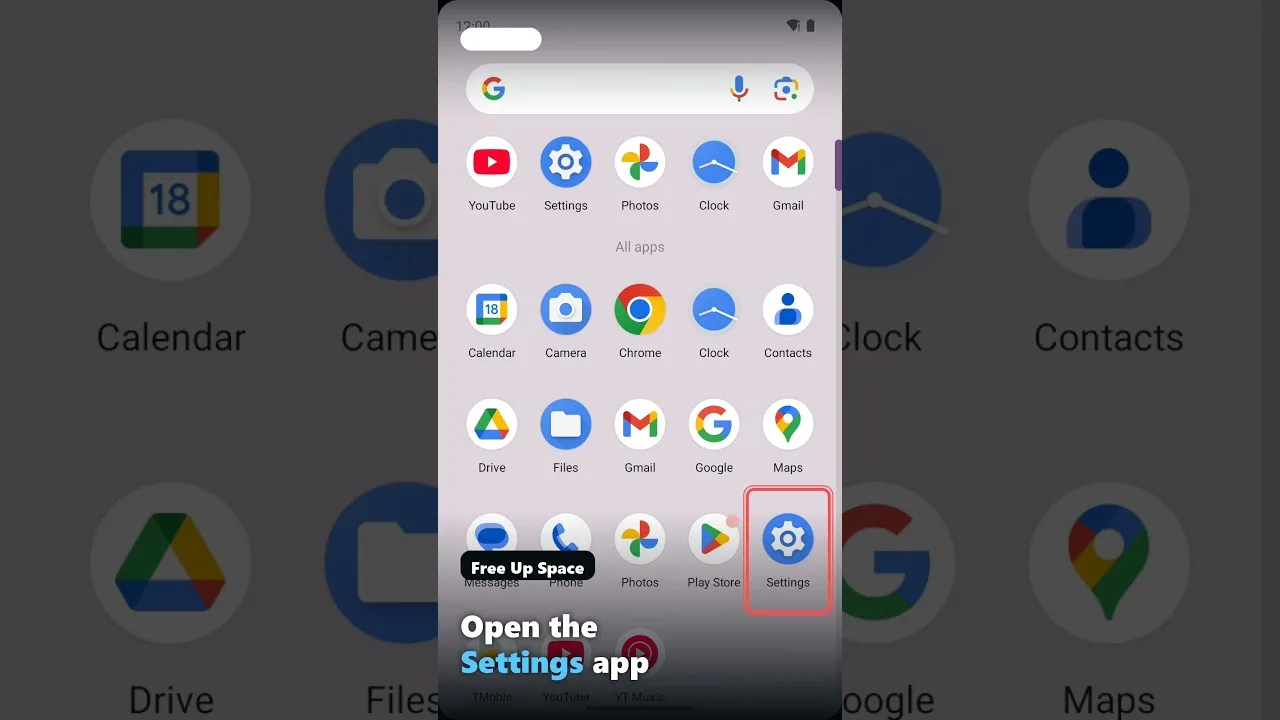
Open Android Settings, go to Apps, find Cast X TV, and open Storage. Tap Clear Cache — not Clear Data — and confirm. The process takes seconds and requires no reconfiguring afterwards. Return to the app and use it normally; sections repopulate their thumbnails as you browse.
If the app was misbehaving — images not loading, categories showing outdated content — test it now before doing anything else. Cache clearing resolves a large share of odd, hard-to-describe glitches, which is why it appears in nearly every troubleshooting routine, including our not working fixes.
Freeing Storage Beyond the Cache
If storage pressure is the real problem, the cache is only one contributor. Browser downloads, old APK files from previous installs, and other apps' caches usually outweigh it. Messaging apps are the silent giants: years of chat photos and videos routinely exceed 5 GB on family phones.
Android's storage screen ranks apps by size, making the biggest offenders easy to find. On genuinely tight devices, pair this tidy-up with the broader habits in our low-end phone guide: keeping a gigabyte or two free improves everything the phone does, not just streaming.
How Often Should You Do This?
For most users, clearing the cache every month or two — or whenever the app starts feeling sluggish — is plenty. There is no benefit to daily clearing; the cache exists to speed things up, and constantly emptying it forces the app to re-download data it would otherwise reuse, which wastes bandwidth.
When storage warnings appear, treat them as a queue: cache first, forgotten downloads second, chat media third, unused apps fourth. Ten minutes with that checklist restores breathing room on almost any device without deleting a single thing you actually use.
Final Thoughts
Clear Cache is your friend; Clear Data is the emergency option. Learn the difference, clear the cache when the app feels stale or storage runs low, and keep a little free space on the device at all times. That is all the storage management Cast X TV really needs.

More articles
-
How to Update Cast X TV APK to the Latest Version
Keep Cast X TV current: check your version, update safely over your existing install, and confirm everything still works afterwards.
Read article → -

Cast X TV Buffering Fixes: How to Stop Lag and Freezing
Stop Cast X TV buffering with practical fixes for Wi-Fi, quality settings, casting, and busy live sources, explained step by step.
Read article → -
Best Cast X TV Settings for Smooth Playback
Tune Cast X TV for your phone and network: quality, decoding, casting, and data settings explained in plain language.
Read article → -
How Much Data Does Cast X TV Use? A Streaming Data Guide
Understand Cast X TV data usage per hour at each quality level, and learn how to watch more on mobile data without blowing your plan.
Read article →